Try the New Chrome Extension Design
Overview
After selecting an e-mail, you can view all the issues created from that e-mail. You can also perform various actions on the viewed issues, such as log time, add or remove assignee, and watch or unwatch an issue.
| Expand | ||
|---|---|---|
| ||
The View issues screen will give you a list of issues, with the following information:
|
Quick Steps
Step # | Action |
|---|---|
| 1 | Select an email from your Gmail account |
| 2 | Go to the View Issues screen |
| 3 | All issues related to the selected e-mail will be visible |
| 4 | Perform quick actions (add/remove assignee, watch/unwatch, log work) by clicking on the action icon |
- Select View Issues
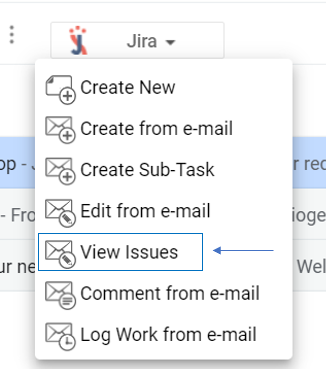
- Perform quick actions by clicking on the option you want from the issues list

| Content by Label | ||||||
|---|---|---|---|---|---|---|
|