Step
#
Action
Click on the AI - Smart Jira Ticket Creation from GTJ main menu
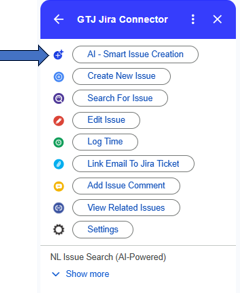
AI will analyze your Email and retrieve the needed data to automatically fill your fields like Project, Issue type, Summary, Assignee, Labels, Priority, Due date according to the selected Email.
Step # | Action |
|---|---|
| 1 | From Gmail, open the email that you want to create a Jira ticket from |
| 2 | Click on GTJ Jira Connector icon to open the app |
| 3 | Click on the AI - Smart Jira Ticket Creation from GTJ main menu
|
| 4 | Wait for the AI to fill the data |
| 5 | Click on the Create button |
| 6 | You're ticket will be successfully created on Jira |