Feature Overview
Admins can now configure the system to block the creation of multiple tickets from a single email. This helps reduce duplication and ensures better ticket management.
Quick Steps
Step # | Action |
|---|---|
| 1 | Go to your Jira instance |
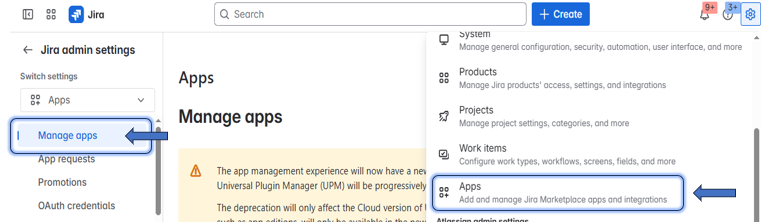
| 2 | Go to Manage Apps
|
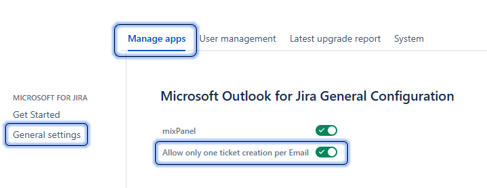
| 3 | On the left side menu, go to 'Microsoft Outlook for Jira' - OTJ app section |
| 4 | Click on General Settings → Then check the option named "Allow only one ticket creation per Email"
|
| 5 | Now, only one ticket is allowed to be created from the same email within OTJ |