New Features
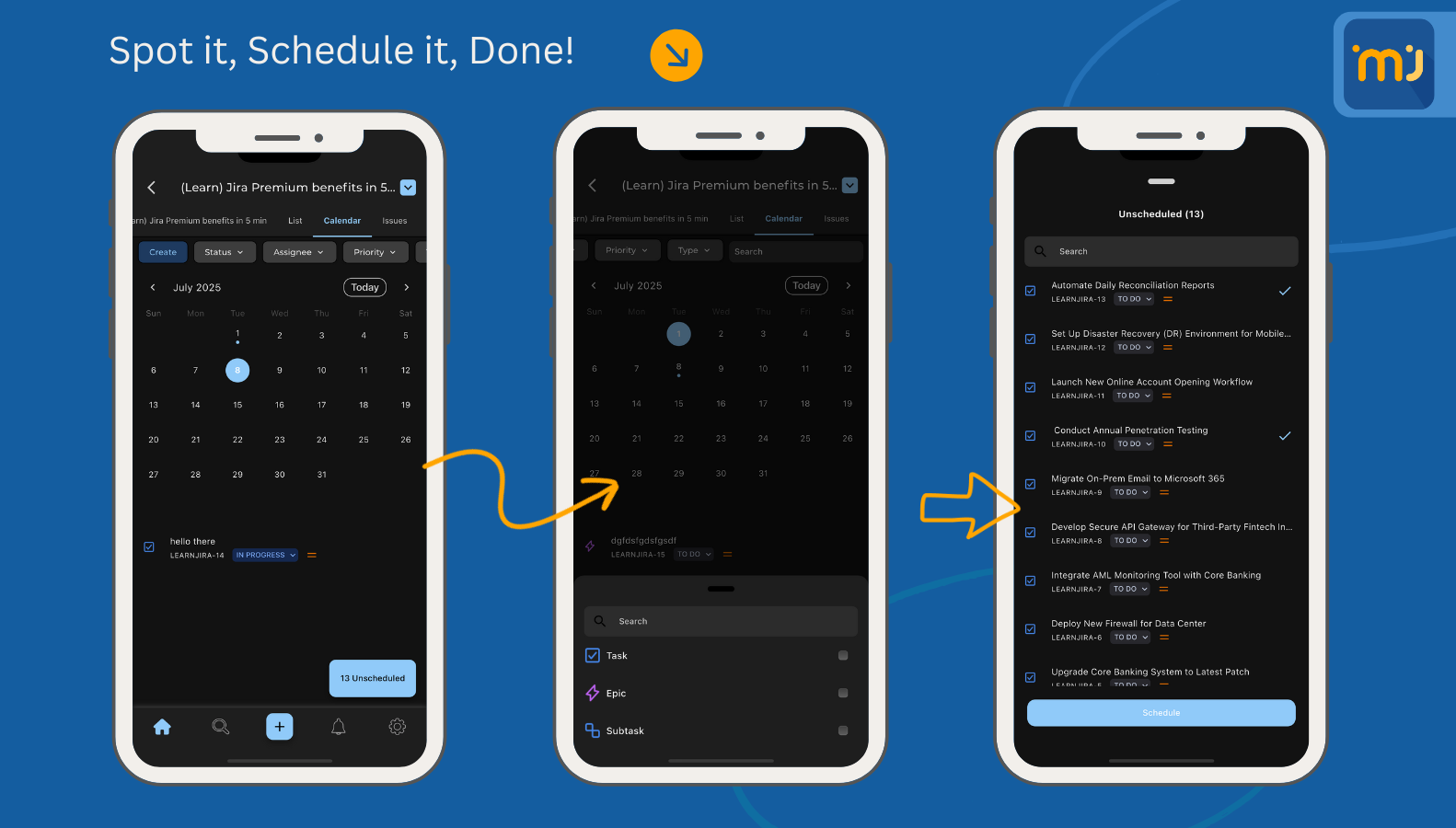
🚀 Introducing Calendar Feature — Built for Power Users!
Say hello to a smarter, faster way to stay on top of your schedule in Jira. With Calendar Mode, your issues and deadlines come to life on a timeline that keeps your team aligned and in sync. From planning sprints to tracking due dates, Calendar Mode ensures you never miss a beat.
✨ Why you’ll love it:
📅 A clear, visual view of issues by due date, sprint, or assignee.
🔔 Smart reminders so deadlines never sneak up on you.
🔍 Filters that adapt — only see the projects and tasks that matter.
🚀 Perfect for teams who want to balance planning and execution.
From scheduling releases to managing daily tasks, Calendar Mode transforms how you organize your work on the go.
- Cloud Notifications: Support Cloud Notifications.
- Attachments to Gallery: Support Saving downloaded images to your phone's gallery.
- Smart AI: Support Smart AI for Jira for DC instances.
- New Voice Recorder: Support a new and improved voice recorder.
- Support for adding tables in comments: Now you can easily add tables in the comment screen.
Improvements
Filter List Improvements: Several key improvements and fixes for the filters screen.
Notification List Improvements: Improved performance and usability for the notification list.
Translation Improvements: Several key improvements for translations, especially for Arabic and RTL.
Home Screen Improvements: Several Key improvements to home screen search UX, and enhancements for sorting functionality.
- Login Screen Improvements: Several Improvements to login functionality, especially for Jira 10+.
- General Improvements: General improvements around the app.
Bug Fixes
- Asset Cloud details Issue: Fix an issue that was causing the asset details to show a gray screen in some cases.
- Asset Details from details screen in DC issue: Fix an issue in the DC details screen, which was causing some cases to not show the whole screen.
- Details screen URL field issue: Links in details fields in the details screen are clickable now.
Issue Transition from Dashboard: Fixed a bug where transitioning issues from the issue details screen (accessed via the dashboard) was not possible.
- Issue details dates: Fix an issue that, for some time zones, the time would add a +3hours in some cases.
- Create a Subtask issue: There was a rare case causing the screen to behave wrongly; now it's fixed.
- Table issues in description: The edited text is saved in the wrong field in the case of tables.
- Tempo Cloud issues: Fix an issue that was causing the Tempo feature to not work properly when first initiating the feature.
- General Bug fixes: General bug fixes around the app.