This release includes:
- An important fix that restores the proper display and handling of inline images and attachments in Jira when creating Jira tickets from emails that contain embedded media or attached files. We’ve upgraded the integration to use Microsoft Graph API, ensuring reliable rendering and compatibility with Microsoft updates.
- The returned summary in AI Create is fixed to be returned in the same language as the email.
Why This Update Was Needed (MS Graph API)
Microsoft has begun deprecating parts of the Exchange Online API across Microsoft 365 tenants. As a result, certain features relying on these older endpoints were impacted, including:
Inline images failing to display correctly in Jira
Attachments not appearing or rendering in Jira
What We Changed
Migrated attachment and inline-image retrieval to Microsoft Graph API, Microsoft’s modern and supported API layer.
Updated request handling to ensure all media content (attachments, embedded images) is fetched through Graph.
Improved rendering logic in Jira so images and attachments now display correctly.
Action Required
To ensure everything works smoothly:
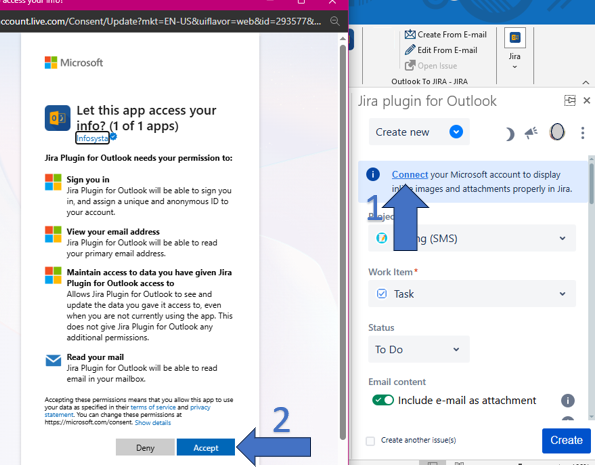
Connect your current Microsoft account using the updated Microsoft Graph integration.
Grant the requested permissions when prompted — this enables secure access to images, attachments, and email data via Graph API.
For Tenants Where Users Cannot Directly Grant Access
In most tenants, users may not have the ability to directly grant the necessary permissions. In this case, an admin request is required.
Admins should follow these steps to provide access:
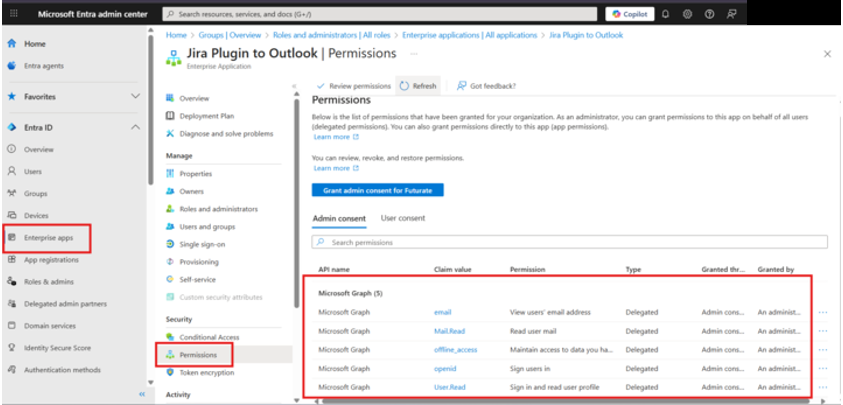
Log in to the Microsoft Entra Admin Center using an account with the appropriate admin privileges.
Navigate to → Enterprise Applications → locate Jira Plugin for Outlook application
Select Permissions / API Permissions and grant admin consent for the required Graph API scopes.
Confirm that permissions have been successfully applied for all affected users.
Inform users that they can now reconnect their Microsoft accounts from OTJ to complete the setup.
We’d love your feedback! Please let us know how these updates enhance your workflow.
Don't hesitate to leave a review here!