Feature Overview
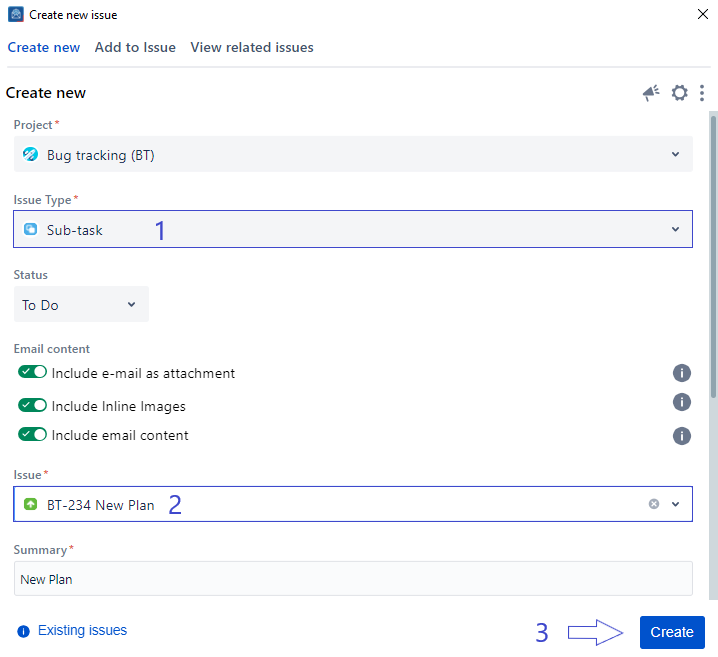
When you opt for the Sub-task issue type, a new issue field will become visible on the Create screen. This field will serve as the parent for your issue, and you can easily locate it by conducting a text-based search.
You can also create a subtask from the View issue screen, to find out more, go to this link.
Follow these steps
1. Go to your Outlook toolbar
2. Choose Create issue
3. Fill in the requested fields
4. Choose Subtask under the Issue type
5. Search for the issue parent
6. Click on the Create button
Related Content
-
Core - How to Create a New Component (Microsoft Outlook for Jira)
-
Core - How to Show/Hide Fields (Microsoft Outlook for Jira)
-
Core - How to Create a New Fix Version (Microsoft Outlook for Jira)
-
Core - How to Link Issues from the Create Screen (Microsoft Outlook for Jira)
-
Core - How to Log Work from the Create Screen (Microsoft Outlook for Jira)
-
Core - How to Create New Jira Issues from Microsoft Outlook for Jira (Microsoft Outlook for Jira)
-
Core - How to Create a New Customer in a Service Desk Project (Microsoft Outlook for Jira)
-
Core - How to Preview Attachments (Microsoft Outlook for Jira)
-
Core - How to Rename Attachments (Microsoft Outlook for Jira)
-
Core - How to Mention User in description (Microsoft Outlook for Jira)
-
Core - How to View Screen Tabs (Microsoft Outlook for Jira)
-
Core - How to Enable Tempo API to Log Work (Microsoft Outlook for Jira)