Feature Overview
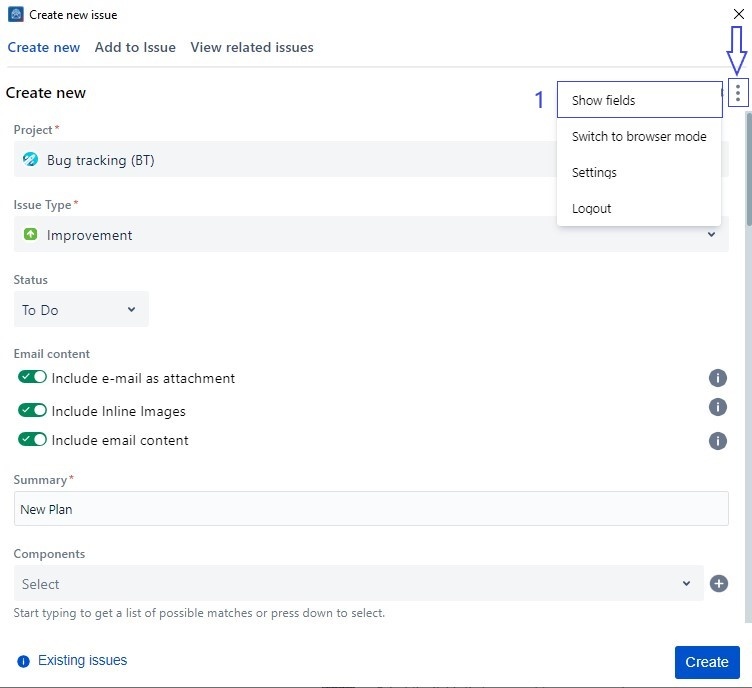
In this guide, we will show you how to make use of the Configure field feature, similar to the one in Jira, to choose which fields to show/hide from the Create screen.
Follow these steps
1. Click on the three dots menu button in the top right corner
2. Select Show fields for the popup to appear
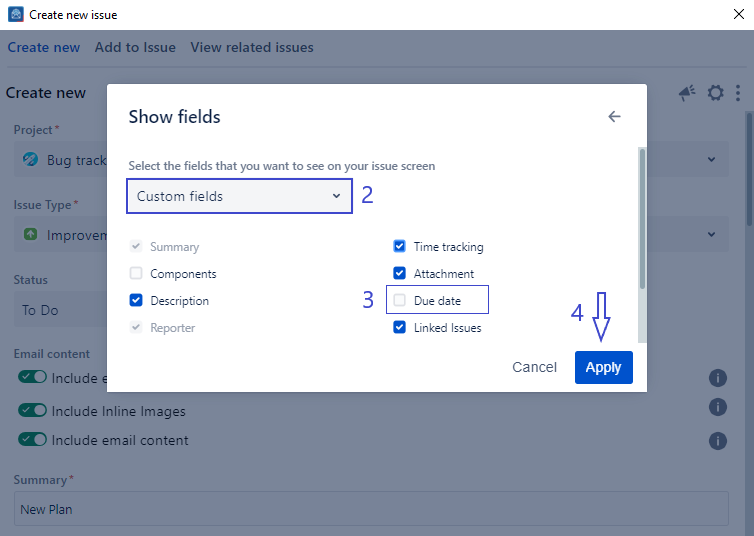
3. Select custom fields from the drop-down
4. Select/Deselect the fields you wish to show/hide
Related Content
-
Core - How to Create a New Component (Microsoft Outlook for Jira)
-
Core - How to Create a New Fix Version (Microsoft Outlook for Jira)
-
Core - How to Link Issues from the Create Screen (Microsoft Outlook for Jira)
-
Core - How to Create a Subtask (Microsoft Outlook for Jira)
-
Core - How to Log Work from the Create Screen (Microsoft Outlook for Jira)
-
Core - How to Create New Jira Issues from Microsoft Outlook for Jira (Microsoft Outlook for Jira)
-
Core - How to Create a New Customer in a Service Desk Project (Microsoft Outlook for Jira)
-
Core - How to Preview Attachments (Microsoft Outlook for Jira)
-
Core - How to Rename Attachments (Microsoft Outlook for Jira)
-
Core - How to Mention User in description (Microsoft Outlook for Jira)
-
Core - How to View Screen Tabs (Microsoft Outlook for Jira)
-
Core - How to Enable Tempo API to Log Work (Microsoft Outlook for Jira)