Quick Steps
Step # | Action |
|---|---|
| 1 | After Creating a new ticket from your Gmail/Calendar |
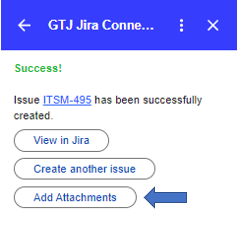
| 2 | In the success page, click on the Add Attachment button
|
| 3 | A popup will open, select files from your device or drag and drop files |
| 6 | Once done click on Upload |
Step # | Action |
|---|---|
| 1 | After Creating a new ticket from your Gmail/Calendar |
| 2 | In the success page, click on the Add Attachment button
|
| 3 | A popup will open, select files from your device or drag and drop files |
| 6 | Once done click on Upload |